
What are accounting journals, and when do I need a new one?
| Intagya ERP

A journal is where money movements of one kind are recorded: sales in one, purchases in another, and each bank account and cash box in its own. You need a new one when you open a new bank account or cash box, or want a branch's invoices kept apart. In Intagya ERP you add it from Journals in a simple window, and the bank or cash account is created for you.
A small company opened a second account at another bank to receive customer transfers. The accountant booked its lines in the first bank's journal, since it was a bank too. At month-end neither account matched its statement, and two days went into pulling the lines apart.
The numbers were right. The place they were recorded was not.
What is a journal in plain words?
A journal is a register where money movements of one kind are written in order. Every sales invoice goes to the sales journal, every vendor bill to the purchase journal, every movement on a bank account to that bank's journal. Each journal has a short code that appears in its entry numbers, such as INV for sales, so the entry number alone tells you where it came from.
Which journals does my company have from the start?
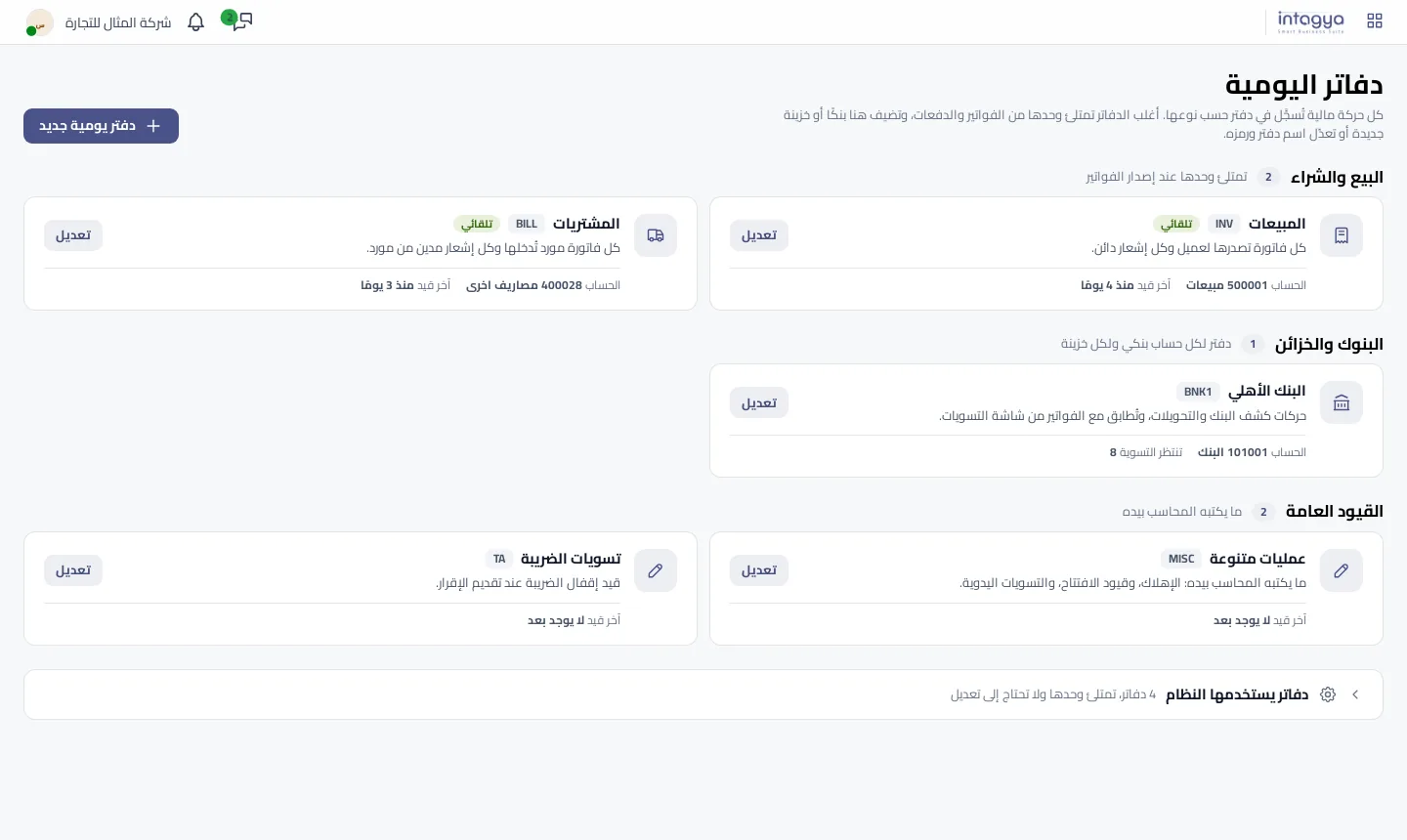
In Intagya ERP open Accounting, then Journals in the Accounting menu. Each journal is a card, grouped by use:
- Sales and purchases, marked Automatic, because they fill by themselves when invoices are issued.
- Banks and cash: one journal per bank account and per cash box, with the number of transactions waiting to be reconciled on the bank card.
- General entries: what the accountant writes by hand, such as opening entries and manual adjustments.
Each card has a line saying what the journal records, its default account and when the last entry was made. A journal whose last entry is months old is worth a question.
When do I need a new journal?
The rule is short: one new journal for each real new place money comes in or goes out.
- A new bank account: a new bank journal.
- A cash box at a branch: a new cash journal.
- Branch invoices with their own numbering: a separate sales journal.
- A recurring kind of manual entry you want kept apart: a miscellaneous journal.
And when don't I need one?
We are firm on this: no journal per customer, per month or per employee. Those details belong in the partner, the date and the label. Too many journals make reports harder and add nothing a search would not show you.
How do I add a new bank in Intagya ERP?
- Press New journal at the top of the page.
- Pick the type first: bank, cash box, sales, purchases or miscellaneous entries.
- Write the journal name, such as the bank's name. The system suggests the short code, such as BNK2, and you can change it.
- For a bank, add the bank account number if you like.
- Press Save journal.
You do not need to open the chart of accounts and create a bank account yourself: a bank or cash box gets its own account in the chart automatically. Adding and editing are for accounting managers.
Name the bank journal after the bank itself. A month from now, on the reconciliation screen, you will know which statement you are matching without thinking.
What if I close a bank account?
Do not delete the journal. Press Edit on its card and turn off the Active switch. A stopped journal keeps all its entries and no longer appears in lists. The same window changes the name, short code and bank account number, and Advanced settings opens the full form for anything else.
What are the folded journals at the bottom?
They are the journals the system uses: stock valuation, exchange difference, cash basis taxes and leases. The system fills them from its own operations and you do not need to change them. They are folded so they do not distract you from the journals you work in every day.
Tomorrow's step: open Journals and compare the banks and cash section with your real bank accounts. If an account has no journal, you now know why your balance does not match the statement.
Read the journals steps in the user guide
FAQ
Do I have to create an account in the chart before adding a bank?
No. A new bank or cash journal gets its own account in the chart of accounts automatically.
What does Automatic mean on the sales journal?
The journal fills by itself when invoices are issued, so you do not write entries in it by hand.
Can I delete a journal I no longer use?
Better to stop it with the Active switch in the Edit window: it keeps all its entries and leaves the lists.
Who can add or edit a journal?
Accounting managers.
Is this your business?
Want to see IntagyaERP on your own workflow?
Book a demo, tell us how your business runs, and watch the system handle a real scenario from your company.
Book a demo