
How do I turn a quotation into a full written proposal in my company's name?
| Intagya ERP

Write it inside the quotation itself in Intagya ERP. Open the Write proposal tab, pick one of your company templates or an empty page, write your sections freely, and the price and payment tables come from the order lines. Then check the PDF with your logo and colours before the customer gets it.
A large customer asks you for a proposal. You write the introduction and scope in a separate file, copy the figures from the system into a table, and then the customer changes two quantities an hour before the deadline. You update the quotation and forget the file.
The proposal arrives with one total and the sale order with another, and the customer asks which one is right.
The trouble is not the writing. It is that the words live in one place and the figures in another.
Why is a plain quotation not enough for large deals?
Because it answers one question: how much? Whoever decides on a large deal wants to know what you will do, when, how they pay, and who you are. A page of lines says none of that.
If you sell items at fixed prices to customers who know you, a plain quotation is fine, and nothing changes. A quotation with no sections prints as usual, so your daily work stays as it is.
How do I write a full proposal inside the quotation?
You write it in a new tab inside the quotation, on a sheet that looks like what the customer will get.
- Save the quotation and open the Write proposal tab.
- Pick one of your company templates, or start from an empty page.
- Type straight into the sections; the text is saved as you go.
- Add what you need: free text, a table you write yourself, an image, the price table or the payment table.
- Reorder sections with the arrows, and hide from the PDF whatever this customer should not see.
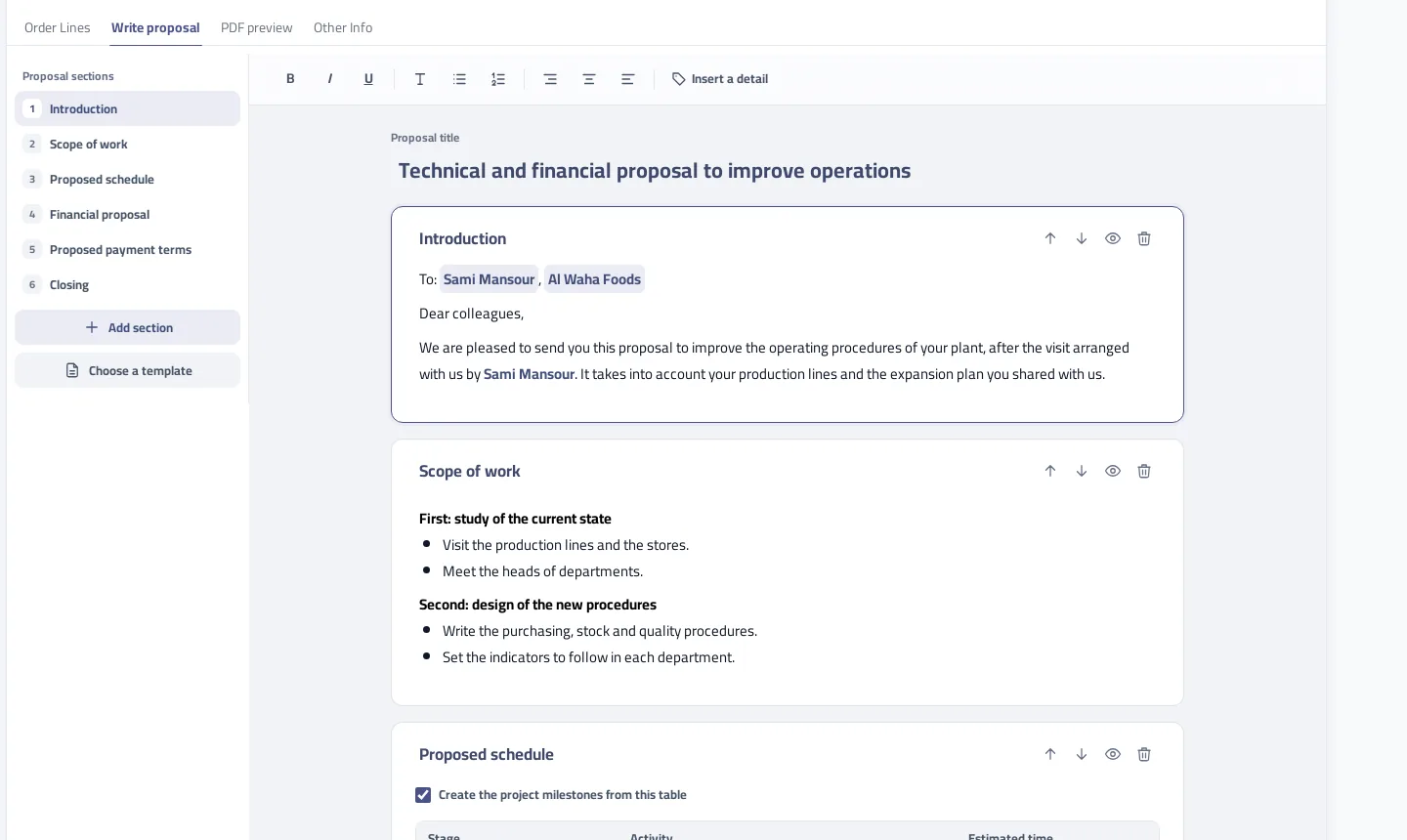
Insert a detail saves a lot of work. It adds the customer name, contact person or proposal total and fills it from the order, so when the same text goes to another customer only the name changes.
To name a person or company in the text, type @ and part of the name and pick from your contacts. This only writes the name correctly; the person gets no alert.
Do the prices in the proposal stay in step with the order lines?
Yes, because the proposal keeps no figures of its own. The price table is read from the order lines each time, so a changed quantity or price changes the table and the total together. That is what stops the scene we started with.
The payment table works the same way. Pick equal payments, monthly, quarterly, every six months, yearly, or milestones with your own percentages. With milestones you might write 30% on signing and 40% on delivery, and whatever is left of 100% appears as a final payment without you working it out.
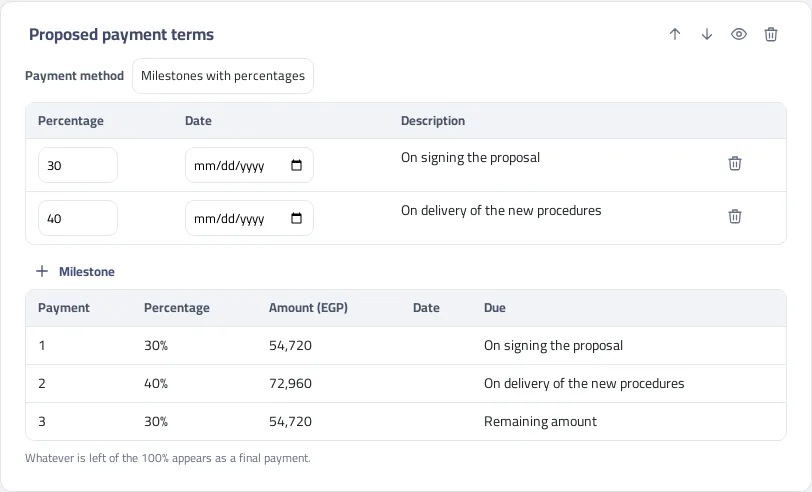
Payment amounts come from the order total including tax. If the order has a payment plan, the table shows its instalments instead, so the proposal never promises something other than what will be invoiced.
How do I see the file exactly as the customer will get it?
In the PDF preview tab, a separate tab next to the writing one. What you see there is no approximation: the system makes the same file that comes out when printing, in the mail attachment and on the customer portal.
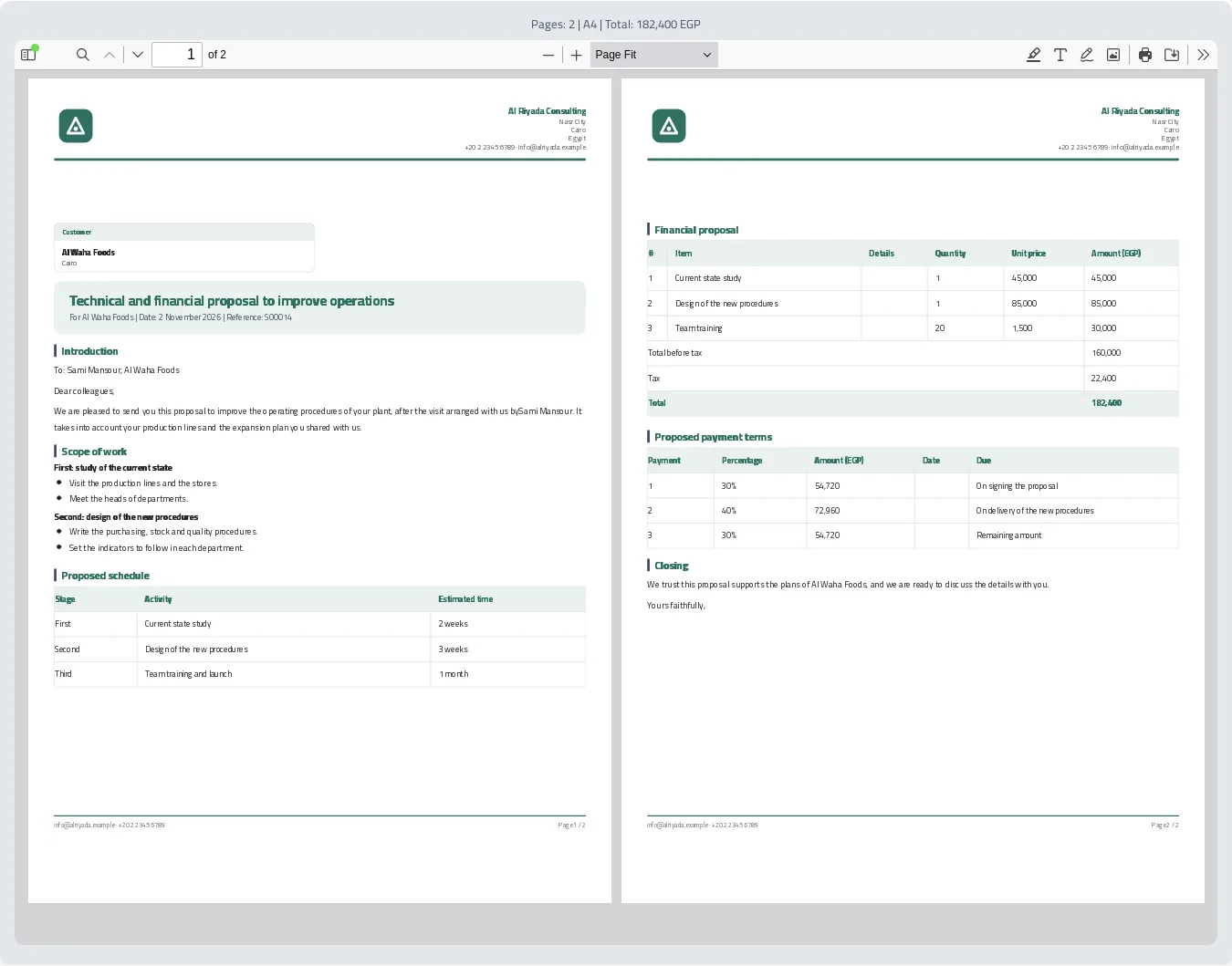
Logo, address and colours come from your company page, so a salesperson never has to think about formatting. They write, and every file leaves with one identity.
Can I build templates for my own company?
Yes, and each company has its own. You start with three: services and consulting, supply, and annual maintenance contract. The sales manager edits them from Proposal templates and the team uses them as they are.
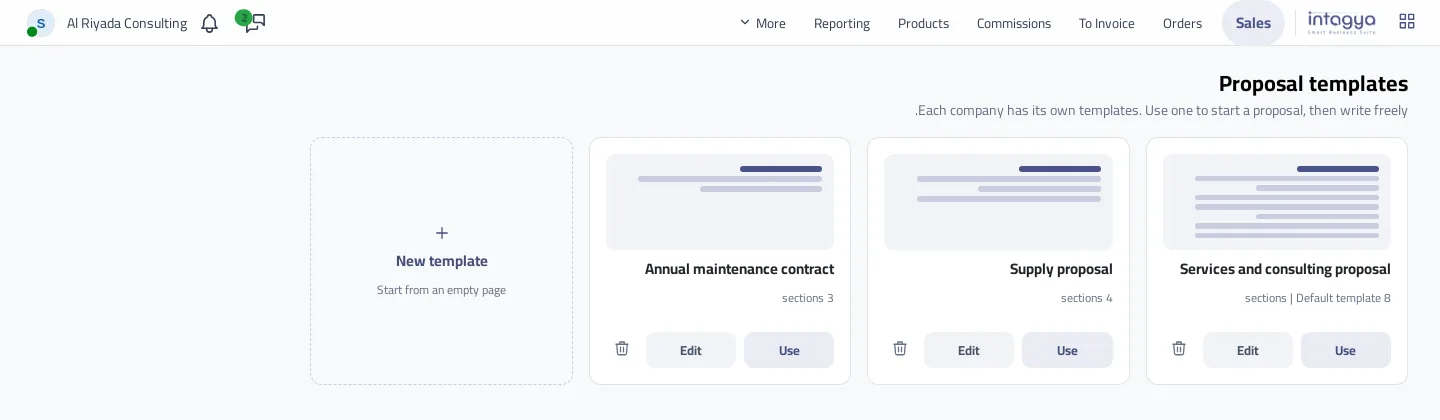
My advice is not to design a template from nothing. Write a real proposal for a real customer, and if it works press Save as template. A template that came out of a won deal beats one drafted in a meeting.
How do I stop a proposal leaving before a manager has read it?
Turn on the quotation workflow in the Approvals app; it stays off until your company wants it. Send for Approval then shows on the quotation. While it waits the text stops changing, Confirm locks, and printing or sending stop with a clear message. What the manager reads is exactly what goes out.
Decide which deals deserve a written proposal. If you demand one for every small order, the team will drift back to side files.
Tomorrow morning, take the last proposal you sent to a large customer and turn it into one template in the system. Ask one salesperson to use it on their next deal, and improve the template from what they notice.
Read the written proposals steps in the user guide
FAQ
Must I write a proposal for every quotation?
No. A quotation with no sections prints as usual, and the writing tab is there only for those who need it.
Does this work on a sale order too?
Yes. The same tab is on the sale order and stays open after confirming unless the order is locked or cancelled.
Does the person I name with @ get an alert?
No. The @ sign only writes the name from your contacts into the proposal. It sends no message or alert.
Can I write a proposal in English?
Yes. The file follows the text: if the proposal holds Arabic text it runs right to left, otherwise left to right.
Is this your business?
Want to see IntagyaERP on your own workflow?
Book a demo, tell us how your business runs, and watch the system handle a real scenario from your company.
Book a demo