
How does a hosting and domain company stop chasing renewals by hand?
| Intagya ERP

Make every service its own subscription with a type, plan, duration and renewal date. In Intagya ERP the invoice is issued and sent ahead of the date by the days you set per duration, a reminder follows if it stays unpaid, and one list shows what renews, what is late and what stopped.
A customer called on Sunday morning, angry: his company site would not open. Half an hour later the employee found that the domain had expired two days earlier, and that the renewal date lived in an Excel file only one person ever opened. That person was on holiday. Nobody got the technical work wrong. The file did.
Why is an Excel file not enough to follow renewals?
Because a file does nothing. It stores a date and waits for someone to open it and notice.
Small problems pile up too. A customer changed plan and the row was not updated. An invoice went out twice. Another never went out, because the person who remembered it left. That loss shows in no report, since nobody sees what was never billed.
How do I organise different services for one customer?
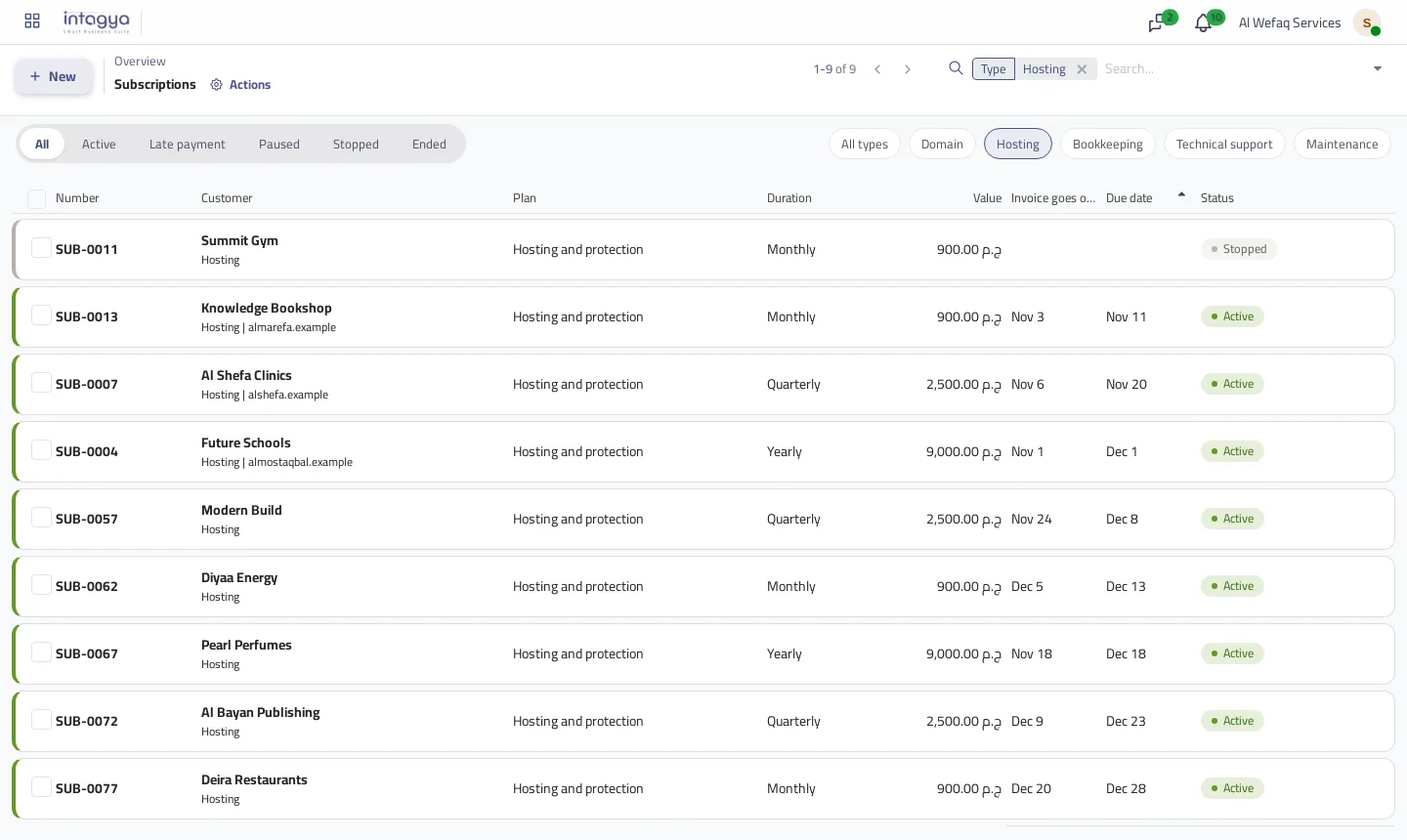
Give each service its own subscription. One customer may hold a yearly domain, quarterly hosting and monthly support, each with its own date, price and invoice.
In the Subscriptions app you start with types: domain, hosting, bookkeeping, support, maintenance, plus any of your own. A type carries its own field, so a domain records its name and hosting records its site.
How do I set a different price per duration?
The plan is the single place for prices. You enter the monthly, quarterly and yearly price and switch off what you do not sell. A domain, say, sells yearly only, so it keeps one duration.
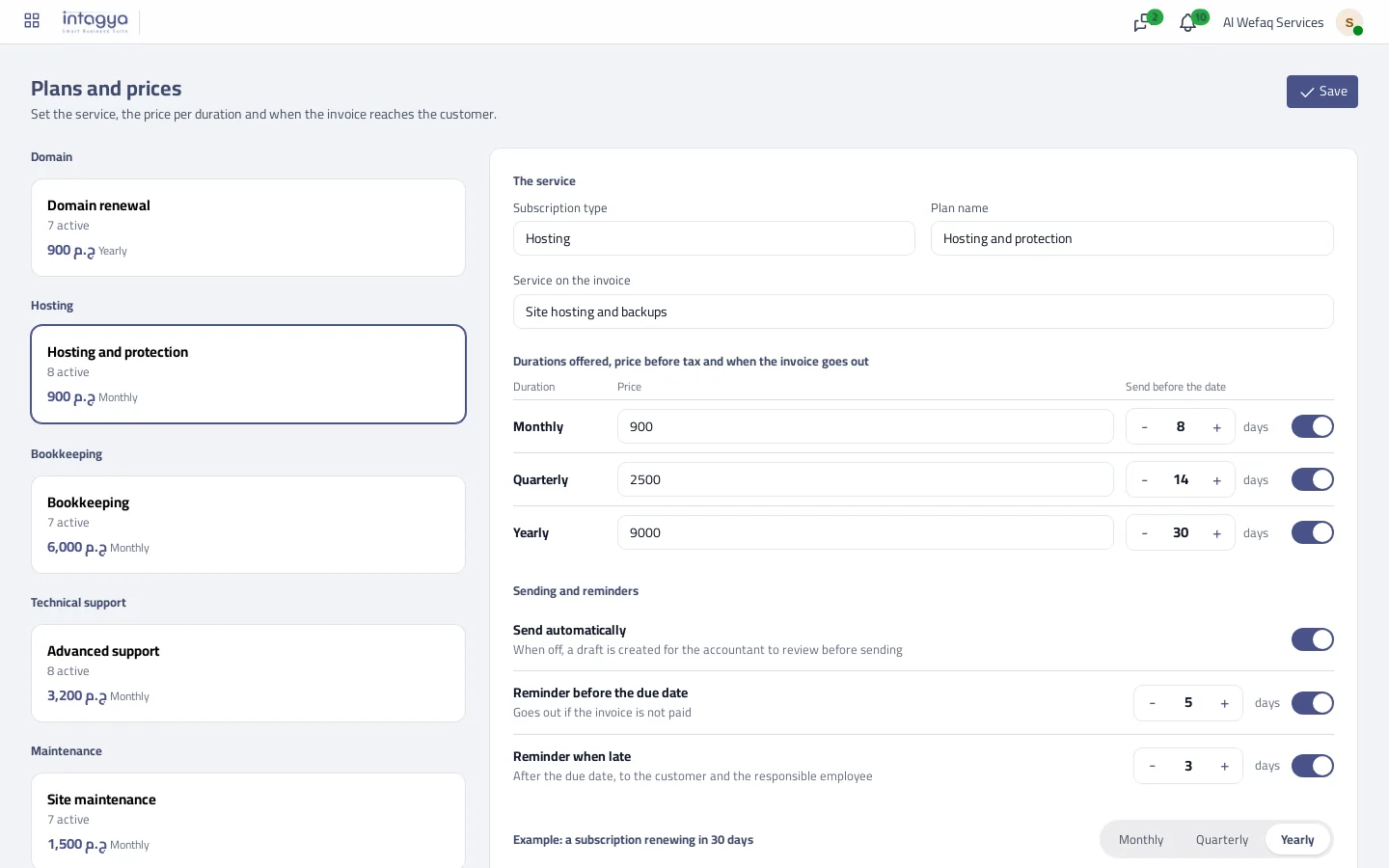
Change a price and it applies from the next cycle. Past invoices stay as they were, which is what you want when the year's accounts are reviewed.
How long before renewal should the invoice go out?
It depends on the service. A small monthly invoice is fine with seven days. A yearly renewal usually needs a month, because larger companies pass payment through several people.
So you set the days per duration. If you want to check an invoice before it leaves, switch off automatic sending on the plan and a draft waits for the accountant.
What happens if the customer does not pay?
A reminder goes before the due date, another after it by the days you choose, and the responsible employee gets an activity about the late invoice. The subscription shows as late in the list and under Needs following up on the overview.
The system does not cut a service by itself. That call stays yours, because a customer who is a week late may be your best customer.
What do the dates look like for a customer with three services?
A made-up example: one customer has a yearly domain renewing on 1 June, quarterly hosting on 15 June and monthly support on 10 June. You set 30 days for yearly, 14 for quarterly and 7 for monthly.
- The domain invoice goes out on 2 May.
- The hosting invoice goes out on 1 June.
- The support invoice goes out on 3 June.
Three separate invoices on three dates. The app does not merge them into one monthly invoice.
How do I move a customer who has been with me for years?
Use their next renewal date as the start date, not the old contract date. Cycles are built from that date, and an old one makes the app see missed cycles and issue an invoice for each, one per daily run, until it reaches today.
What does the Subscriptions app not do?
It does not renew a domain at the registrar or take a site off a server. It handles the money side: the date, the invoice, the reminder and the follow-up. The technical renewal stays with your team.
The price comes from the plan and duration for all customers, so there is no special price for one customer inside a plan. If you agreed one, create a separate plan for that customer.
Do not move everyone in one day. Start with one type, domains are a good choice because their mistakes cost the most, check the dates against your invoices, then move the rest.
Open the Subscriptions app, create one plan with its prices and add your first five customers. Within a week you will know whether leaving the old file was worth it.
Read the subscriptions guide step by step
FAQ
Can one customer have a domain and hosting?
Yes. Each service has its own subscription and date, and each subscription gets its own invoice.
Does the system cut the service when an invoice is late?
No. It sends reminders and alerts the responsible employee. Stopping is your decision.
Can I add a type that is not listed?
Yes. A subscriptions manager adds types from the plans screen and sets the field each type records.
What if a customer has no email?
The invoice is still issued, and the responsible employee gets an activity to add the address because it was not sent.
Is this your business?
Want to see IntagyaERP on your own workflow?
Book a demo, tell us how your business runs, and watch the system handle a real scenario from your company.
Book a demo