
How do I send the invoice to a customer ahead of its date automatically?
| Intagya ERP

On the subscription plan you set the days ahead for each duration. Every day the system checks the subscriptions, and when the date arrives it issues a normal customer invoice in Accounting and emails it with a PDF and a payment link. The invoice date is the day it is issued, and the due date is the renewal date.
At the end of the month the accountant sits with the list of monthly customers. Open last month's invoice, copy it, change the date, send it. Forty times. On the thirty-eighth she misses one.
Next month that customer asks about an invoice that never came. Nobody was careless. Repetitive work like this should simply not depend on someone paying attention.
Why send the invoice before the due date at all?
Because customers need time. An invoice arriving on the due date is already late, since companies review, approve and only then pay.
When it arrives early, there is less talk about delays and you look organised. I think this is the cheapest improvement you can make to collection.
How do I set the days ahead of the date?
You set them per duration on the plan. Seven days for monthly, fourteen for quarterly and thirty for yearly, for example. Each subscription page shows them on one line: the invoice, the reminder, the due date and the late reminder.
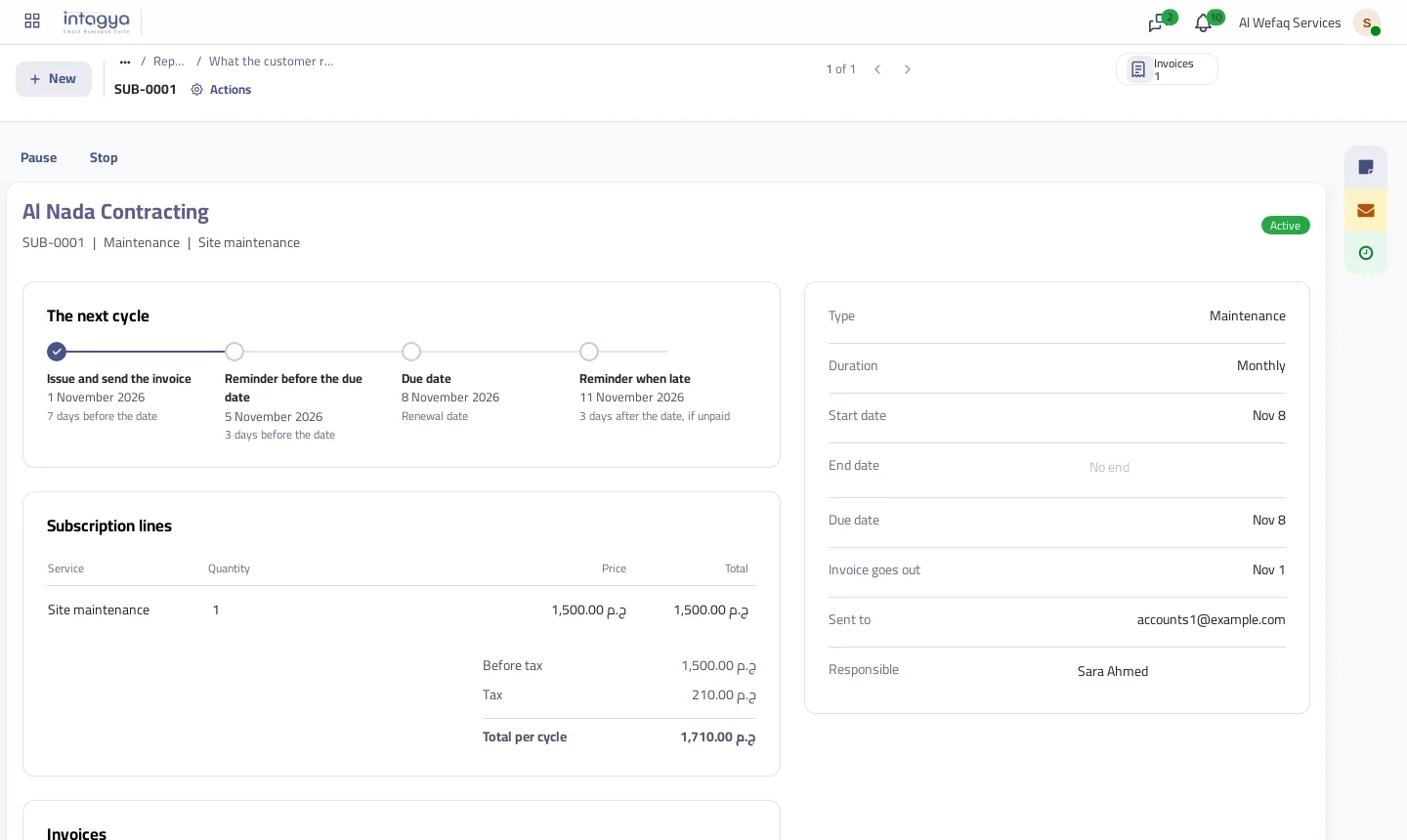
The reminder has to follow the invoice, so the system refuses reminder days equal to or above the shortest sending lead.
Does the invoice show in Accounting?
Yes, and that is the point. It is not a separate record to move across. It is a normal customer invoice with its entry and tax, in the customer invoices and on the customer's account.
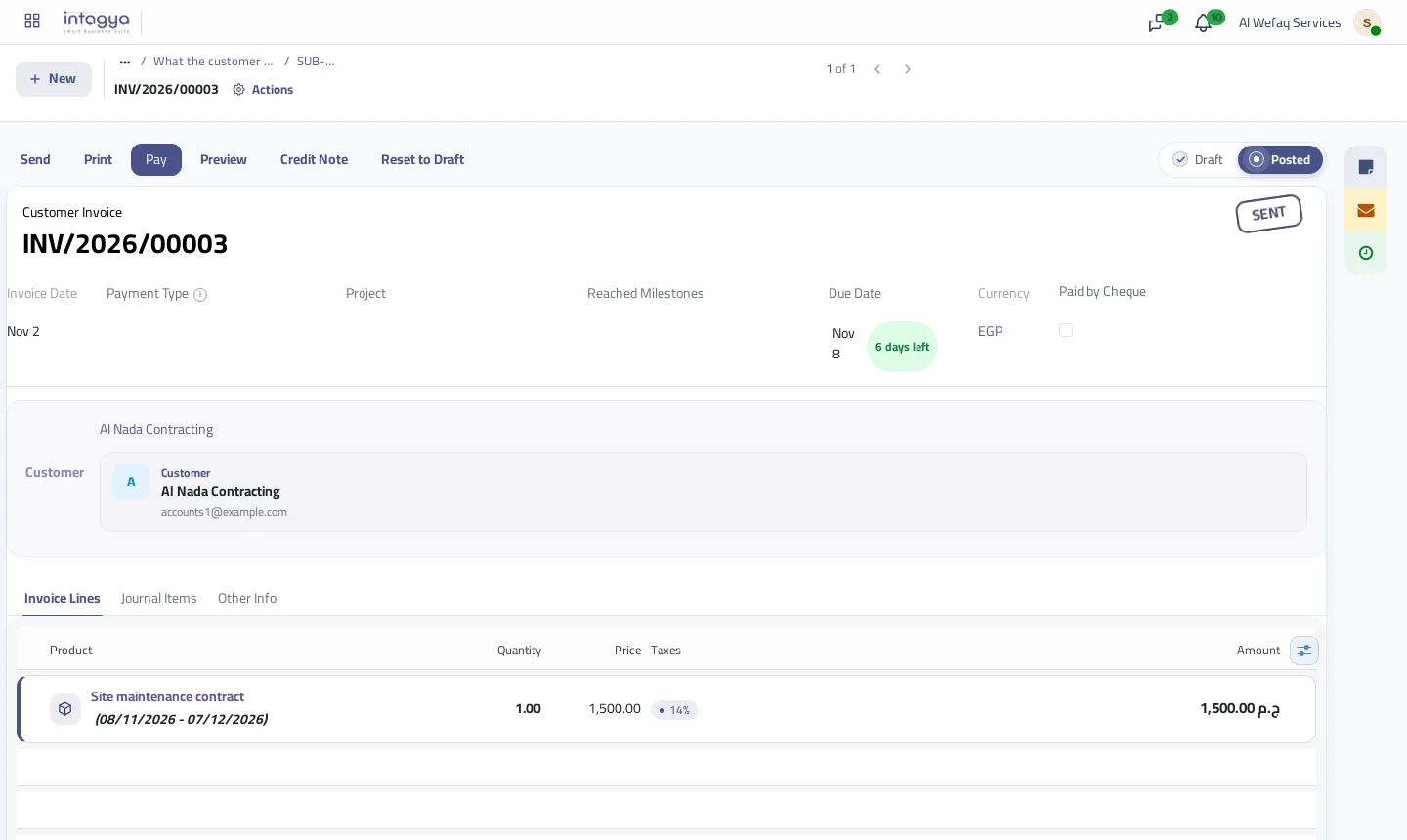
Each plan has one service product, which brings the income account and tax, while the price comes from the subscription's duration. The invoice line states the service period from date to date, so nobody asks what they are paying for.
What does the customer see in their mail?
A short message with their name, the subscription, the amount and the due date, a PDF, and a button that opens the invoice for payment.
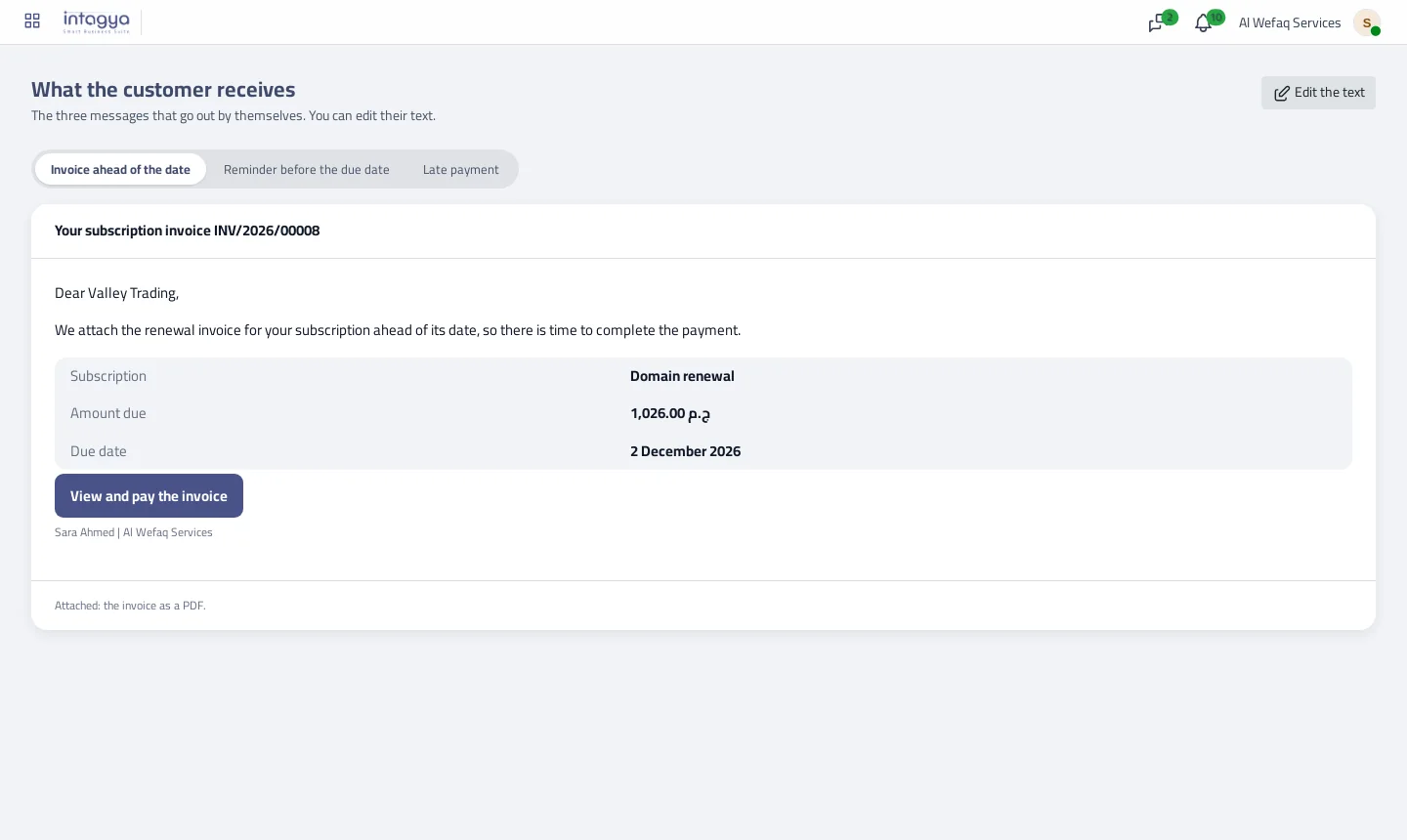
There are three messages: the invoice, a reminder before the due date and a reminder when late. A customer who has paid gets no reminder.
Can I review the invoice before it goes out?
Yes, per plan. Switch off automatic sending and a draft is created on time, with an activity for the responsible person. I would do this for services whose value changes or needs an accountant's eye, and leave the rest automatic.
One cycle never gets two invoices, even if someone presses Issue invoice now ahead of the date.
How does a full cycle run, with dates?
A made-up example: a yearly support subscription renews on 1 December, sending 30 days ahead, a reminder 3 days before and a late reminder 3 days after.
- On 1 November the invoice is issued and reaches the customer.
- On 28 November a reminder goes out if it is unpaid.
- On 1 December it falls due, and the subscription then moves to its next cycle.
- On 4 December the late reminder goes out and the responsible employee gets an activity.
All of this happens in one run a day. You do not pick the sending hour, and if the run stops for a day the invoice is not lost: the next run issues it.
What about the invoice date and tax?
Talk to your accountant about this before raising the days. The invoice date is the day it is issued, not the day the service starts. A service starting in December with an invoice issued in November is recorded in November.
The app also does not spread a yearly invoice across the months of service. It is recorded like any invoice, on its date. If your company needs that spreading, it is accounting work apart from the subscription.
What if the customer pays part of the invoice?
The invoice stays unpaid, so its reminders continue, and the message shows the amount left rather than the full value.
The automatic late reminder goes once per invoice. After that it is a human decision: you can send a reminder from the subscription page, which I prefer to repeated messages annoying a customer who may only be waiting for an internal approval.
Start with the default days and watch for two weeks. If customers pay long before the date, reduce them. If delays repeat, raise them.
Try it on one plan this week, and let your accountant watch invoices go out instead of typing them.
Read the subscriptions guide step by step
FAQ
What are the invoice date and due date?
The invoice date is the day it is issued. The due date is the renewal date.
Can I edit the message text?
Yes, from the What the customer receives screen, with Edit the text.
Do customers who paid get reminders?
No. Reminders cover unpaid invoices only.
Can one cycle get two invoices?
No. Each cycle has one invoice, even with the Issue invoice now button.
Is this your business?
Want to see IntagyaERP on your own workflow?
Book a demo, tell us how your business runs, and watch the system handle a real scenario from your company.
Book a demo