
Can AI create the invoice and log the follow-up for me?
| Intagya ERP
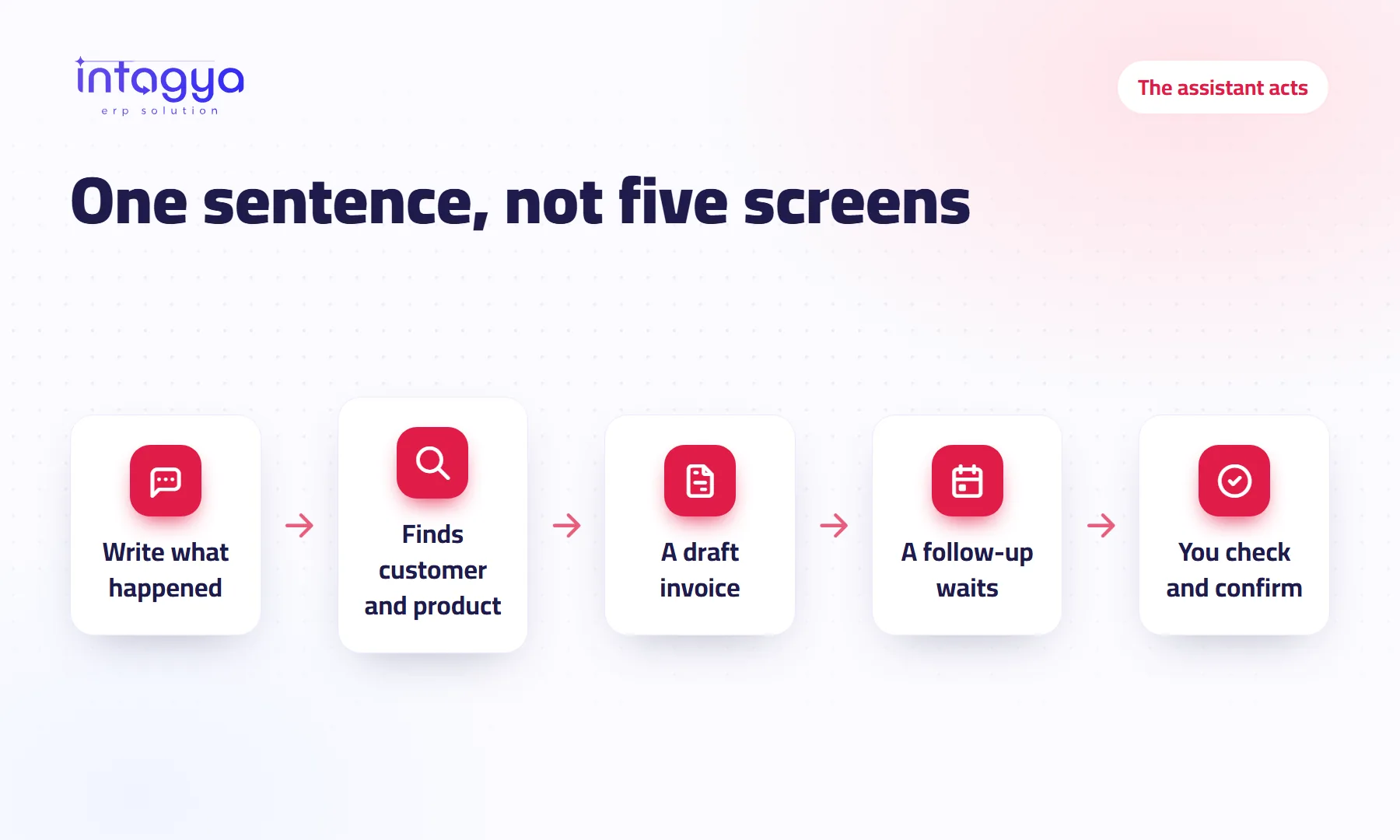
Yes, within clear limits. In Intagya ERP you type your request in the assistant box on the home screen, and it creates a customer invoice in draft, or prepares a note and a follow-up activity on a sales opportunity and waits for you to press Confirm. It never posts or sends the invoice, and it never has more rights than you. The assistant is part of the paid intagya AI add-on.
A sales rep finishes a call with a customer in the car. The customer agreed to three consulting hours, asked for a quote for twenty users, and promised to reply on Thursday.
Back at the office, the rep has to open Sales and create an invoice, then open CRM, find the opportunity, write a note and schedule a call. Five screens for two sentences the customer said.
Most people leave it for the evening. Some forget it.
What happens when I type "create an invoice" to the assistant?
In the box under the greeting you type a normal sentence: "Create an invoice for Al Ofoq: 3 consulting hours at 500 an hour". The assistant finds the customer and the product in your system, creates a customer invoice in draft, and shows it in a card with the lines, the tax and the total.
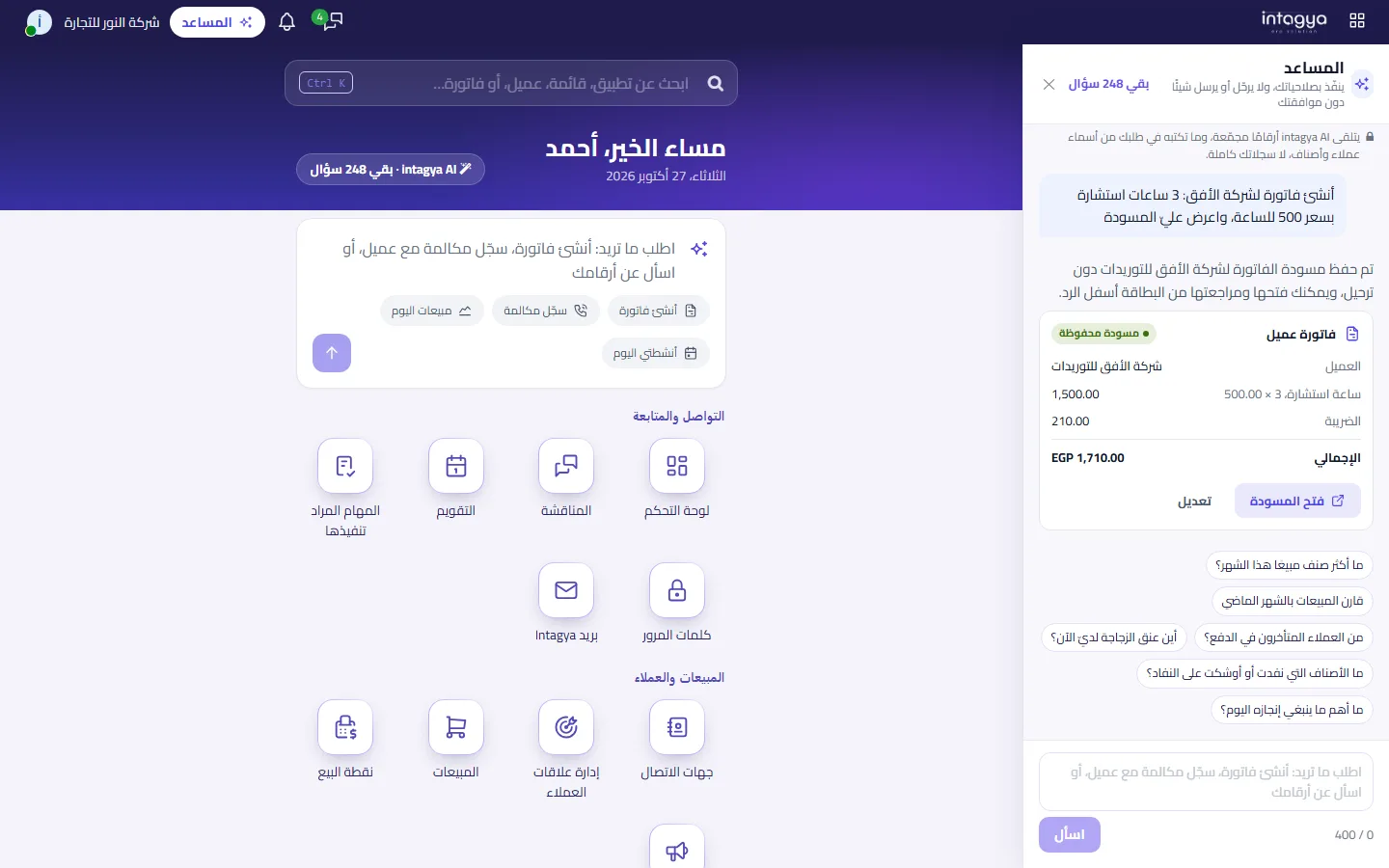
The draft is saved, but it is a draft. Nothing is in the books and nothing reached the customer. You press "Open draft", check it, and confirm it yourself when you are happy with it.
With no price in the request, it takes the sales price from the product card. For a service with no product, you write it as a description with an explicit price.
What if I have two customers with the same name?
This matters more to us than speed: the assistant does not guess. If it finds "Al Rayan Contracting" and "Al Rayan Est.", it lists both and asks which one you mean, and creates nothing until you answer.
An invoice on the wrong customer is worse than an invoice half an hour late.
Can it log the call and set the follow-up?
Yes. Tell it what happened the way you would tell a colleague: "I called the Al Ofoq opportunity, they asked for a quote for 20 users, set a follow-up on Thursday". It prepares an internal note on the opportunity and a call activity on Thursday, assigned to you.
The difference here is that it saves nothing on its own. The note reaches everyone who follows the opportunity, so a card says "Waiting for you". Press "Confirm" and everything lands in its place, or "Edit" and your request goes back to the box for you to correct.
Can it do something I am not allowed to do?
No. The assistant works with the rights of the employee who wrote the request, not with the administrator's. Someone who cannot create an invoice by hand will not get one from the assistant, and someone who cannot edit the opportunity will not even see the follow-up tool.
Everything the assistant does or proposes is recorded: who asked, what, when and on which record.
What does the assistant not do yet?
We would rather say it before you find out:
- It does not post an invoice, send it to the customer or register a payment.
- It does not create a new customer or product; if it cannot find the name, it asks you to add it first.
- It does not apply pricelists and discounts by itself; it uses the price you wrote or the product card price.
- It does not create a quotation, a sales order or a purchase order.
In our view the right start is the work that repeats every day and is easy to undo. Posting and sending stay your decisions.
How much does each request cost me?
The assistant is part of the paid intagya AI add-on. Each request counts as one question from the month's quota, and what is left shows at the top of the conversation. Pressing "Confirm" or "Edit" is free, and a failed answer is not counted and leaves no half-made invoice.
If you prefer your own OpenAI or Anthropic key you can connect it, with no question limit, and your provider bills you directly.
Compare the intagya AI packages
Does it send all my company data to the AI?
No. For questions about your figures only aggregated figures go out. For work requests, your request text goes with the matching customer and product names and prices, not your full records. Your data is not used to train models.
Try it tomorrow morning with the first call: write what the customer said in one sentence and let the assistant prepare the follow-up. Then compare the time with the old way.
The assistant guide, step by step
FAQ
Does the assistant post the invoice or send it to the customer?
No. It only creates a draft, which you check and confirm yourself on the invoice screen.
What if I type a customer name that does not exist?
It tells you it could not find it and does not create a new customer. Add the customer first, then ask again.
Does pressing Confirm use a question from my quota?
No. Only the request you send is counted; Confirm and Edit are free.
Who sees the assistant box on the home screen?
A workspace with an active intagya AI subscription or a connected own key. Each employee uses it with their own rights.
Can I write the request in Arabic?
Yes, and it answers in the language of your request.
Is this your business?
Want to see IntagyaERP on your own workflow?
Book a demo, tell us how your business runs, and watch the system handle a real scenario from your company.
Book a demo