
How do I split technician visits so two of them never drive to the same area?
| Intagya ERP

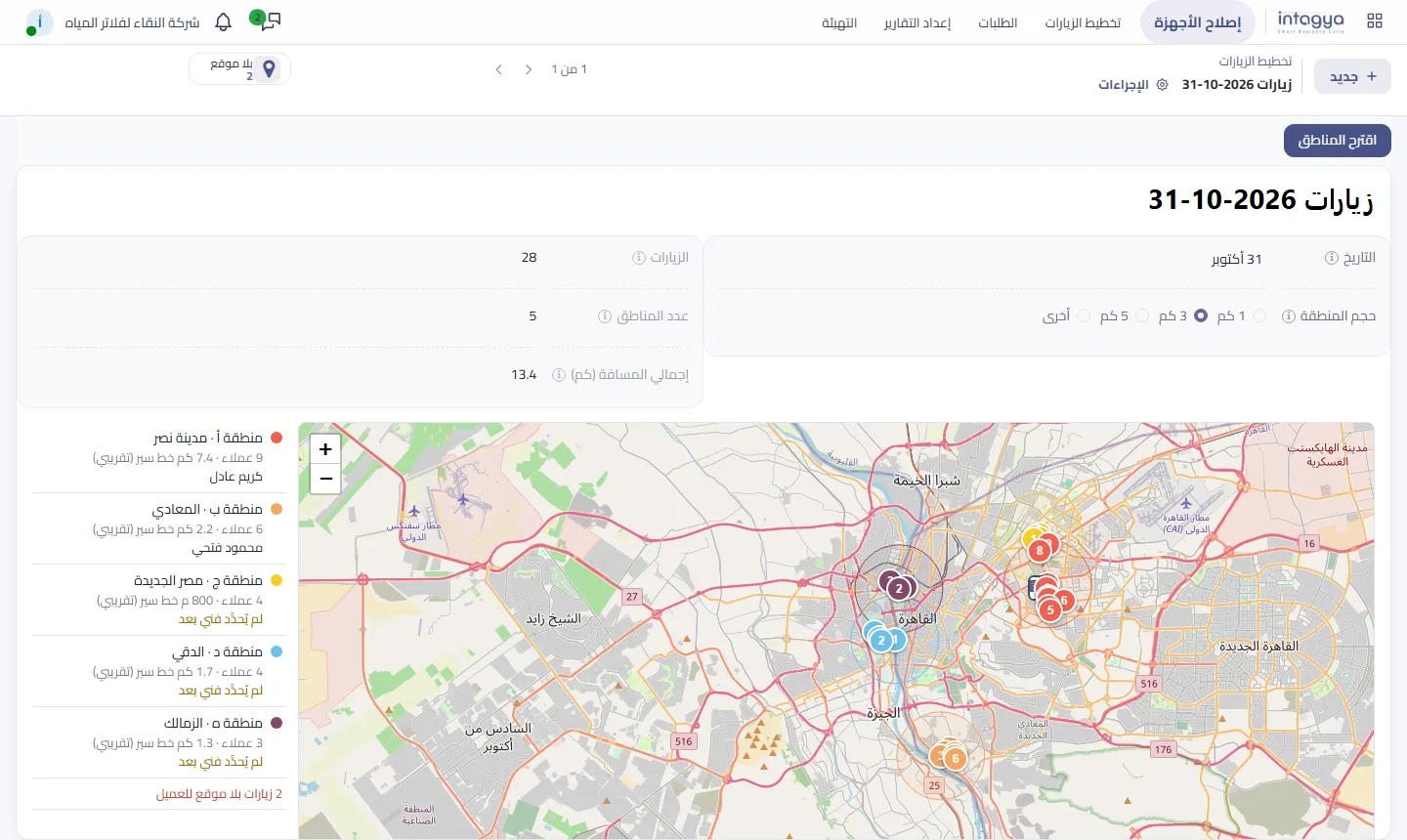
Give every customer a location link from Google Maps, then split each day's visits into zones by distance, 1, 3 or 5 km, and give each zone to one technician. In Intagya ERP the Visit Planning screen does this: it shows the zones on a map, suggests the visiting order and the distance from each customer to the next, and the technician's app shows the nearest customer first. This way the technician does their work properly from the mobile app.
Ten in the morning. Karim is in Nasr City changing filter cartridges for a customer on Abbas El Akkad Street. An hour later Mahmoud pulls up at the next building for another customer, because the two requests came in on different days and were handed out in order, not by place.
Two technicians in one district, two trips, fuel twice. On the other side of the city a customer in Maadi has been waiting since morning.
Why is handing out requests in turn not enough?
Taking turns is fair to the technicians, but it knows nothing about the map. Each one takes the next request on the list and crosses the city and back for customers two streets apart.
A sharp coordinator fixes this from memory. They know which districts sit next to each other and group the requests on paper. Then they take a holiday, or the customer list grows, and all that order is gone.
What do I need before I split visits into zones?
One thing: a real location for every customer. A written address is not enough; "next to the big mosque" does not measure a distance.
Ask the customer to send their location on WhatsApp, or open Google Maps and find their home, then copy the link and paste it on their record once. After that nobody asks for the address again.
Start with the customers who have visits this week, not the whole customer list. Within a month most of the people who call you will have a location.
How do I pick the right zone size?
The zone size is the furthest a customer can be from the middle of their zone. In a busy district like Nasr City or Heliopolis, 1 or 3 km gives zones a technician covers in half a day. If your customers are spread across new cities, 5 km or more fits better.
Do not look for the right number on day one. Try 3 km and look at the map. A zone with a single customer means the size is too small; a zone with fifteen means it is too big for one technician.
Who goes where, and in what order?
You pick a technician for each zone, and all its visits become theirs at once. The system suggests an order that starts from the visit nearest your warehouse, then the nearest each time, with the distance from each customer to the next and the length of the whole round.
The distance is a straight line, and the road is always longer. It is still enough for what you actually need: knowing which zones are heavy and which are light, and sharing the technicians out on that basis.
There is one decision worth thinking about: do you force the order on the technician? We think not. The technician on the street knows the traffic better than any map. So the app shows the customers of their zone from nearest to where they are now, and they decide. This way the technician does their work properly from the mobile app.
And what does the technician see at the customer's door?
A summary of the last service: when it was, what was noted and which spare parts went in, with quantities. Before opening the filter they know the membrane was changed two months ago and the problem is probably somewhere else.
The summary never shows the name of the technician who came before, even if it was typed in the notes. Many repair business owners asked for this, for a reason: they do not want the customer to become one technician's customer.
When does this not help me?
With a single technician, zones add little; sorting the visits by distance is enough. And if your visits are booked at exact times that cannot move, the place comes after the time, and you will keep adjusting the plan by hand.
If three or more technicians go out to the same city every morning, the difference shows in the first week.
Where do I start tomorrow morning?
- Add the location link of your company or warehouse, then the links of tomorrow's customers.
- Open tomorrow's plan, choose 3 km and press "Suggest Zones".
- Look at the map: does each zone suit one technician? Make the size bigger or smaller and suggest again.
- Pick a technician for each zone and save; each one is notified of their visits.
The steps with screenshots in the user guide
Try Intagya ERP free for 14 days
FAQ
Do I need a paid Google Maps account?
No. You paste the location link from Google Maps as it is, and the map in the system comes from OpenStreetMap with no account or key.
Are the distances exact?
They are straight lines between customers and the road is longer. They work for comparing zones and ordering visits, not for exact fuel costs.
What if a visit is added after planning?
Press "Suggest Zones" again so the new visit enters, then pick the technician for each zone again.
Does the technician see who visited before?
No. The last-service summary shows the date, notes and spare parts, and any technician's name in it reads "the repair team".
Is this your business?
Want to see IntagyaERP on your own workflow?
Book a demo, tell us how your business runs, and watch the system handle a real scenario from your company.
Book a demo