
How do you run all your branches from one system?
| Intagya ERP

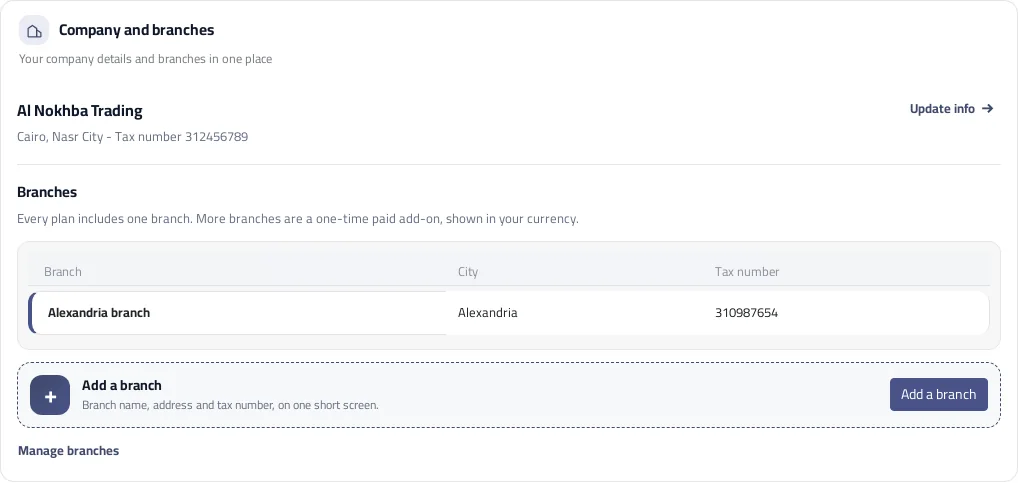
From Settings open Company and branches, press Add a branch, then enter the name, address and tax number. In Intagya ERP every plan includes one branch, and an extra branch is a paid add-on bought once and shown in your currency.
The owner of a supply company opened a second branch in Jeddah. The first thing he did was order a new copy of the software for it. Three months later he had someone merging both branches' numbers into an Excel file every Thursday, and finding the mistakes on Saturday.
The new branch was not the problem. The problem was that the company had become two systems.
Why does a separate copy for each branch not work?
Because each copy needs someone to run it, the same customer gets entered twice, and nobody sees the full picture without merging by hand. Separation feels safe on day one, then turns into weekly work with no end.
My view is to start the second branch inside the same system, however small it is. Moving a branch from a separate system later is far harder than adding it today.
Where do you find the company and its branches in one place?
Open Settings, then Company and branches. At the top are your company details and the Update info button, and below them a table of branches with each one's name, city and tax number.
How do you add a new branch?
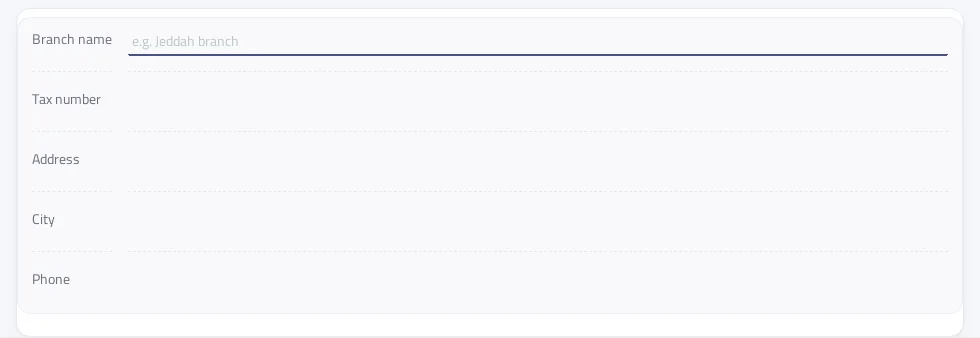
Press Add a branch and one short screen opens: branch name, tax number, address, city and phone. Save, and the branch appears in the table at once.
Do not try to finish everything the first time. Add the branch, then open it from Manage branches and complete its letterhead and documents when they are ready.
How much does an extra branch cost?
The first branch is included in every plan. Once it is used, a strip tells you so with Add a paid branch, which takes you to the apps screen where you see the price in your own currency before you decide.
What matters for your budget is that it is paid once. It is not added to your monthly fee, so you carry no recurring cost for a branch you opened years ago.
Does each branch print documents with its own details?
Yes. Each branch has its own address, tax number and document details, and it can have its own letterhead. This matters when a branch has a different tax registration from the main company, so check with your accountant what each branch's invoices must show before the first one goes out.
If you are planning a new branch, open Company and branches today and add it a week before opening. Try one invoice on it, check the address and tax number, then let the team start.
Set which branches each user may work in, so nobody issues an invoice in the name of a branch they do not work at.
FAQ
Is an extra branch a monthly subscription?
No. It is paid once and is not added to your monthly bill.
How many branches does a plan include?
One branch with every plan. The main company itself does not count as a branch.
What happens when I reach my branch limit?
A strip says the included branch is in use, with Add a paid branch to continue from the apps screen. The system does not accept a branch beyond your limit.
Does each branch have its own tax number and documents?
Yes. Each branch has its own name, address and tax number, and its own document details and letterhead.
Is this your business?
Want to see IntagyaERP on your own workflow?
Book a demo, tell us how your business runs, and watch the system handle a real scenario from your company.
Book a demo