
How do I see what customers owe and collect it on time?
| Intagya ERP
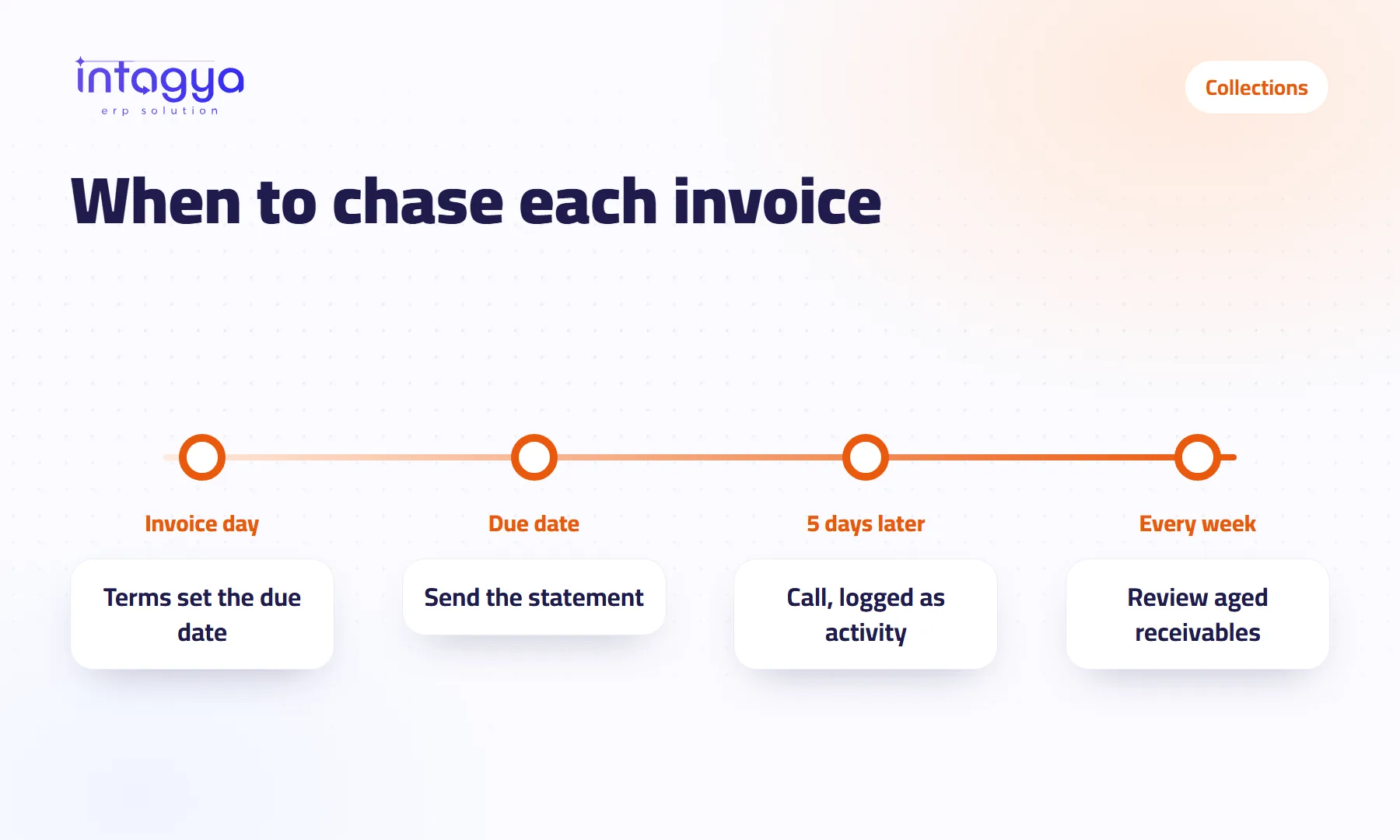
You see what customers owe in the aged receivables report: each customer's balance split by how late it is. To collect on time, give every invoice payment terms that set its due date, review the list of late customers every week, send each one a statement, and log the next call as an activity on the invoice so it does not slip.
A distribution company owner asks his accountant on Sunday morning: “How much does the market owe us?” The accountant opens a ledger, then a spreadsheet, then calls a sales rep about two customers. An hour later there is a number, and nobody fully trusts it.
This article is about getting that number in a minute, and knowing which invoice to chase today.
Why do customers pay me late when sales are fine?
Usually because nobody in your company owns the follow-up, not because your customers are bad. The sales rep thinks his job ended at the sale. The accountant thinks his job is to record what comes in. And customers pay whoever asks first.
There is a simpler reason too. An invoice with no clear due date can never be late. If the rep told the customer “pay when you can”, you have nothing to ask for.
How do I see how much each customer owes right now?
Open the aged receivables report under Financial Reports. It shows each customer's open amount split into columns by age, from not yet due to the oldest. You choose the date to calculate at; partial payments are deducted and the age counts from that day.
The report opens on screen, and you can export it to PDF or Excel for a partner or a meeting.
My advice: skip the grand total at first and look at the oldest column. A week-old debt is a follow-up task. A four-month-old debt is a decision only you can make.
How do I set the payment date from the start?
Put payment terms on the customer record, such as 30 days, or half now and the rest in a month. When the invoice is issued, its due date is calculated from those terms, so nobody types it by hand or forgets it.
A hypothetical case: a plumbing supplies shop sells on credit to contractors. With terms on every contractor, the accountant can see on Thursday every invoice that fell due this week without asking anyone.
How do I follow up late customers without forgetting anyone?
Use the follow-up report. It lists customers with their total due, the overdue part, a status (overdue invoices, needs action, or nothing to do) and the next reminder date. You set the follow-up levels as a number of days after the due date, for example five.
On the invoice itself, log an activity such as “Call the customer on Tuesday”, assigned to the person in charge. On that day the reminder shows up for them, and the invoice keeps a record of what was said on each call.
Be realistic about one thing. The system tells you who to chase and when; it does not send a series of collection emails to customers on its own. A person on your team makes the call or sends the message, and in collections that usually works better anyway.
- Every Sunday: open the follow-up report and filter it to late customers.
- For each late customer: send the statement, then log a call activity with a date.
- After each call: write down what the customer promised and when.
Can I send a customer their statement from the system?
Yes. The customer record has a Customer Statement tab with their invoices, the amount due on each and the balance. Print it as PDF or Excel, or email it to the customer's address with one button.
Send the statement before you call, not after. With the figures already in front of the customer, the call stops being an argument about numbers and becomes one question: when will you pay?
How do I stop a late customer from running up more debt?
Turn on credit limits in the settings and give the customer two amounts: a warning amount and a blocking amount. When their balance reaches the first, whoever creates a sales order or invoice for them sees a warning. At the second, the order does not go through.
Set these amounts calmly, when the relationship starts. A limit decided in anger after three months of waiting tends to be both late and harsh.
How does Intagya ERP help me collect every week?
In Intagya ERP, invoices, payments and reports live in one place. The aged report, the statement and the follow-up report all read the same invoices, so there is no second file to keep up to date. The home dashboard shows your unpaid invoices every morning. If you subscribe to intagya AI, its Analyse button on the receivables report explains where your debts pile up and suggests where to start.
Tomorrow morning, open the aged receivables report, pick the five largest amounts in the oldest column, and log a call activity for each one this week. Just those five.
Try Intagya ERP free for 14 days
FAQ
Does the system send reminder emails to customers automatically?
It does not send a series of collection emails on its own. It shows you the late customers and each one's next reminder date, reminds your staff of the activity logged on the invoice, and lets you email the statement with one button.
Can I see the debts as they stood on an earlier date?
Yes. Pick the date in the aged receivables report and it calculates the open amount as of that day, with partial payments deducted.
What if a customer pays only part of an invoice?
Record the payment on the invoice. The rest stays due and shows in the reports and the statement at its new amount.
Do I need separate accounting software to manage collections?
No. Invoices, payments and financial reports are all inside Intagya ERP and read from the same data.
Is this your business?
Want to see IntagyaERP on your own workflow?
Book a demo, tell us how your business runs, and watch the system handle a real scenario from your company.
Book a demo